Review Comments (0) Screenshots (1) Questions & Answers (0) Votes (0) Awards (4) Wiki  
-Please log in to rate
0 0/5 (0)
-CyberTeam Ltd.
-3.2.2
-www.thesharm.com
- 99 people
Download SHARM

23.9 MBDownloaded 115 times


Review

This review applies to version 2.6 The latest version of this software will soon be reviewed by our informers.

SHARM [Self Hypnosis And Relaxation Machine] is a software tool that helps you explore and experience relaxation, self-hypnosis and altered states of consciousness.
Select from many predefined sessions, or define your own sessions to suit your needs and preferences.
Use our innovative sound technologies with other familiar sounds for mind exploration, self-improvement, relaxation, meditation and more.
SHARM is an excellent instrument for therapists and their clients. Compose accurate sessions by planning and implementing the precise steps of the session: Relaxation, Stabilization, Light Hypnosis, Deepening, Deep Hypnosis, Anchoring and Exit. Mix the session with your own-recorded scripts.
You can listen to the session directly from within SHARM, or you can generate a sound file to be played later, by an audio-CD or MP3 player.
Using SHARM, you can explore and study the influence of different types of sound on your state of consciousness. You are the designer of the session because you are the only one who can learn and understand what is best for you
SHARM can be used for many applications, such as: reducing stress, enhancing creativity, motivation, concentration and creativity, eliminating bad habits, improving sleep and more.
SHARM support many sound technologies, such as: pre-recorded suggestions, user-recorded affirmations, built-in nature sounds, background noise, binaural beats, ambient sound, mixers and more.
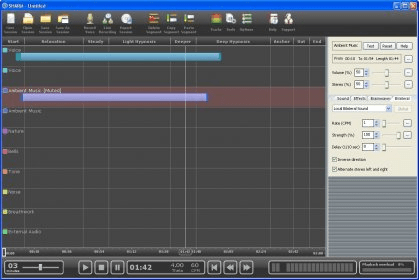
Divide the session into separate stages, like: Relaxation, Stabilization, Light Hypnosis, Deepening, Deep Hypnosis, Anchor and Exit. Add more stages to your session to reflect your design and preferences. Define the length of each stage as a guiding tool for the session design.
Learning to use SHARM is a snap. Just click and drag the mouse to define a segment in the proper track line and time dimension. Then set the properties of the sound for the new segment. You'll create your own complex sessions within minutes.

Screenshots

Main Window Main Window

Latest comments


There are no comments, be the first one!
Add new comment
Tag cloud
Download siClient

Email Address:

Password:

Register now »

Forgot password?

Copyright © 2009, Informer Technologies, Inc. About| Privacy and terms| Help| Feedback